7 Google Ads Settings That Can Waste Your Budget
Google Ads can generate strong leads and still waste money in ways that are easy to miss.
Some of the biggest issues aren’t obvious mistakes. They’re settings that expand where your ads show, what Google optimizes for, or how much control you give the platform.
None of these settings are automatically bad. The problem is when they’re enabled without being reviewed.
Here are seven areas I’d check.This is a Paragraph Font
1. Location Targeting That Reaches Outside Your Service Area
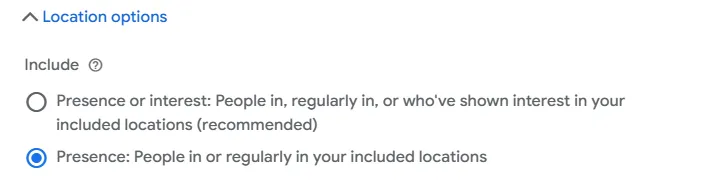
Targeting a city, county, or state doesn’t always mean your ads are limited to people physically located there.
Depending on your settings, Google may also reach people who have shown interest in that location.
For local businesses, that can mean paying for clicks from people outside your service area.
What to check:
Review your location targeting settings and geographic reports to see where your clicks and leads are actually coming from.
2. Google Search Partners
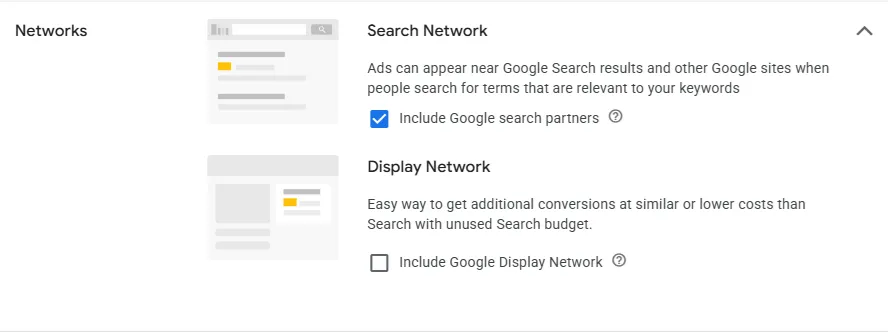
Search campaigns can run beyond Google Search itself.
With Search Partners enabled, your ads may also appear across Google’s partner network.
That extra reach can be useful, but performance and lead quality can differ from Google Search traffic.
What to check:
Compare cost, leads, cost per lead, and lead quality from Search Partners versus Google Search. More reach does not always mean better traffic.
3. Broad Match Keywords
Broad match gives Google more flexibility in deciding which searches can trigger your ads.
That can work well when tracking and bidding are strong, but it can also expose your campaign to irrelevant searches.
What to check:
Review your Search Terms report regularly.
Look at the actual searches people typed, not just the keywords you’re bidding on.
If you’re seeing irrelevant searches, you may need tighter match types, negative keywords, or a better bidding and conversion strategy.
4. The Wrong Conversion Goals
Google’s automated bidding uses the conversion actions you tell it are important.
If the wrong actions are marked as primary conversions, Google may optimize toward activity that isn’t actually valuable.
For example:
Page views
Button clicks
Directions
Calls of any length
Form submissions
Qualified leads
Those actions are not equally valuable.
What to check:
Ask one question...
What exactly is Google being told to optimize for?
For most lead-generation businesses, primary conversions should closely reflect actions that produce real potential customers.
5. Auto-Apply Recommendations
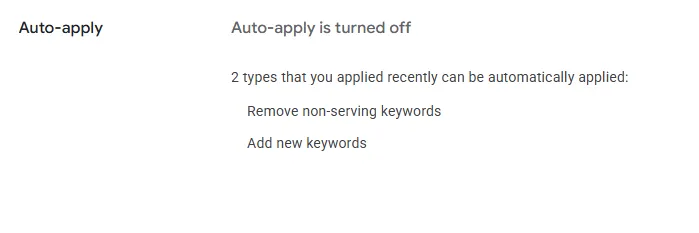
Google Ads can automatically apply certain recommendations to your account.
Depending on what’s enabled, changes can be made without you approving each one individually.
That doesn’t make the recommendations bad, but they may not always align with your priorities around lead quality, geography, profitability, or account structure.
What to check:
Review your Auto-Apply settings and see exactly which recommendation categories are enabled.
You should know what Google is allowed to change automatically.
6. Optimized Targeting
The Optimized Targeting setting can allow Google to go beyond the audiences you manually selected and find additional people it believes are likely to convert.
That can work well, but it also means your selected audience may be more of a starting point than a hard boundary.
What to check:
If you’re running eligible Display, Demand Gen, or video campaigns, check whether Optimized Targeting is enabled and review the performance of that expanded traffic.

7. Final URL Expansion
In Performance Max campaigns, Final URL Expansion can send users to a different page on your website than the one you originally selected.
Google may choose another page if it believes it is more relevant.
That can sometimes send paid traffic to pages you never intended to use as landing pages.
What to check:
Review whether Final URL Expansion is enabled.
If it is, make sure Google isn’t sending traffic to irrelevant pages such as old services, blog posts, careers pages, or other sections that don’t support your advertising goal.
The Bigger Issue
The common theme behind all seven settings is control.
Google Ads increasingly uses automation to decide:
Who sees your ads
What searches trigger them
Where people land
Which conversions matter
Where your budget goes
Automation isn’t necessarily a problem.
But it works best when Google has the right inputs and someone is regularly reviewing the output.
A campaign can generate leads and still have meaningful waste underneath the surface.
Want a Second Set of Eyes on Your Google Ads Account?
I help local businesses identify wasted spend, tracking problems, targeting issues, and opportunities to improve Google Ads performance.
If you’d like, I can review your account and show you what I would change.